A gaming monitor is the component where the specification sheet and the experience diverge most sharply. Refresh rate, response time, and HDR all come with numbers printed on the box, and each of those numbers is measured in a way that flatters the product. Some of them describe something a player will notice within seconds. Others describe a best case that never appears in a game.
Sorting the two saves money and avoids the common outcome, which is paying for a badge that changes nothing on screen.
Why refresh rate matters most on a gaming monitor
Refresh rate is the specification worth spending on, because it changes motion clarity in a way nothing else does. The reason is less about how often the image updates and more about how long each frame sits still in front of a moving eye.
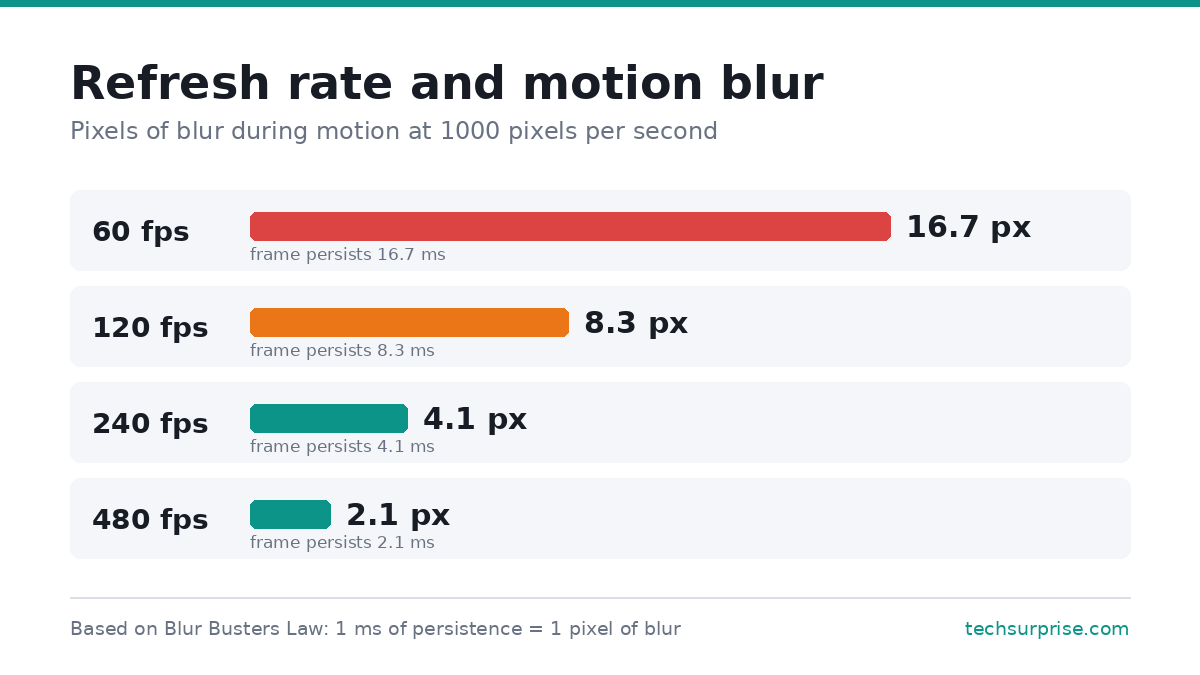
Blur Busters, which has spent years measuring this, expresses the relationship as a simple rule: one millisecond of display persistence produces one pixel of motion blur during motion at 1000 pixels per second. Its breakdown of persistence and motion blur puts the figures in order. At 60 frames per second, each frame persists for 16.7 milliseconds, which smears into roughly 16.7 pixels of blur. At 120 the figure halves to 8.3. At 240 it drops to about 4.1.
That is a real, measurable difference in how clearly a moving target reads, and it is why the jump from 60Hz to 144Hz is the single most noticeable upgrade most players make. The returns diminish after that. Going from 60 to 144 halves the blur and then some. Going from 240 to 360 shaves off a fraction of a pixel, which is why the highest refresh rates are worth the money only to players competing at a level where that fraction matters.
All of that comes with one condition attached, which is that a gaming monitor only refreshes as fast as the graphics card feeds it. A 240Hz panel running a game at 70 frames per second behaves mostly like a 70Hz display, so the panel and the GPU need to be chosen as a pair.
Response time claims and what they leave out
Response time is where the marketing gets loosest. The 1ms figure on most boxes refers to grey to grey transition time, usually the single fastest transition the panel can manage, measured with the most aggressive overdrive setting the manufacturer can apply.
That figure leaves out two things. Grey to grey describes how quickly a pixel changes shade, while the blur a player sees comes mostly from persistence, meaning how long the finished frame stays visible. Blur Busters makes this distinction directly: on modern panels, transitions complete in a fraction of a refresh cycle, so persistence dominates what the eye registers. A display can have near instant pixel transitions and still show heavy motion blur.
An average also hides the failures. RTINGS, which tests panels independently, reports the average of the worst three transitions alongside the headline figure, because a panel that averages well can still take far longer on dark transitions. That gap is what produces the black smearing visible behind moving objects on many VA panels.
Aggressive overdrive causes its own problem. Pushing pixels harder to hit a faster measured time makes them overshoot the target shade, which shows up as bright or dark halos trailing moving objects. The fastest overdrive preset is often not the one that looks best, and the middle setting usually wins.
Variable refresh rate on a gaming monitor
Variable refresh rate lets the panel sync its refresh to the frame rate the GPU delivers, which removes tearing without the input lag penalty of traditional vsync. Nearly every current gaming monitor supports it under one badge or another.
The useful development is that there is now an open standard behind it. VESA published its Adaptive-Sync Display compliance specification in May 2022, the first publicly open standard covering front of screen performance for variable refresh rate displays, with more than 50 test criteria covering refresh rate range, flicker, grey to grey performance, frame drops, and jitter. Certified products carry a logo with the certified maximum refresh rate printed on it, and the list of certified displays is public.
A 2024 update added a dual mode logo for panels that run a higher refresh rate at reduced resolution, covering displays that do something like 4K at 144Hz and 1080p at 280Hz. The certification is not the only signal worth trusting, and plenty of good monitors skip it, but a certified refresh figure has been measured by someone other than the company selling the panel.
HDR badges and which tiers mean anything
HDR on monitors is the specification most likely to disappoint, and the tier numbers explain why. VESA’s DisplayHDR programme runs from 400 through 500, 600, 1000, and 1400 for LCD panels, with a separate True Black scale at 400, 500, 600, and 1000 for OLED and other emissive displays.
Most of the disappointment comes from the entry tier. The DisplayHDR performance criteria require local dimming at 500 and above, and 2D local dimming at 1000 and above, while the 400 tier can meet its specification without local dimming at all. A gaming monitor can therefore carry an HDR badge while producing contrast that looks much like standard dynamic range with a brightness bump.
TFTCentral’s analysis of the certification changes is worth reading on how this happened. Earlier versions of the specification set no static contrast requirement at all, which let low contrast IPS panels carry an HDR label. The updated criteria added a 1300:1 minimum at the 400 tier, rising to 50,000:1 at 1400, which excludes most older IPS and TN panels from the badge entirely.
For HDR that changes how a game looks, DisplayHDR 600 is roughly the entry point on LCD, and the True Black tiers on OLED deliver the contrast that makes HDR worth having even at lower peak brightness.
Resolution, size, and panel type
Resolution and size work together rather than separately. A 27 inch panel at 1440p and a 32 inch panel at 4K land at a similar pixel density, which is the figure that decides how sharp text and fine detail look. A 27 inch 4K panel is sharper still, though it demands considerably more from the GPU for a difference that is subtle at normal viewing distance.
Panel type sets the character of the image. IPS gives accurate colour and wide viewing angles with weaker contrast. VA delivers much deeper blacks and tends to smear on dark transitions. OLED provides near instant pixel response and true black, at a higher price and with static image burn-in still a consideration for anyone leaving a fixed interface on screen for long stretches.
A monitor is usually the largest single improvement available to a player, which is worth weighing before spending the same money on peripherals and other gaming gear.
What to check before buying a gaming monitor
- Match the refresh rate to the graphics card. A high refresh panel fed low frame rates behaves like a slower one.
- Treat the 1ms claim as a best case. Look for independent measurements that report worst case transitions and overshoot.
- Check whether variable refresh rate is certified and over what range, since a narrow range leaves gaps at low frame rates.
- Ignore DisplayHDR 400 as an HDR feature. Consider 600 and above on LCD, or True Black on OLED.
- Pick resolution against the GPU, not against the marketing. 1440p at a high refresh rate is a better result than 4K at 60 frames per second on most hardware.
- Test the overdrive presets after setup. The fastest setting frequently introduces halos.
Frequently asked questions
Is a 240Hz gaming monitor worth it over 144Hz?
For most players, no. The blur reduction from 60Hz to 144Hz is large and immediately visible, while the step from 144Hz to 240Hz is a much smaller improvement in the same direction. It matters for competitive shooters where reaction time is decisive, and it requires a GPU capable of sustaining frame rates near that ceiling.
Does a gaming monitor with 1ms response time stop motion blur?
No. The 1ms figure describes pixel transition speed under favourable conditions, while most visible blur comes from how long each frame remains on screen. Raising the frame rate and refresh rate reduces that blur, which is why a 144Hz panel rated at 4ms usually looks clearer in motion than a 60Hz panel rated at 1ms.
Is OLED worth the extra cost for a gaming monitor?
It depends on use. OLED offers near instant response, perfect blacks, and the best HDR available on a desktop panel, which suits mixed gaming and media use. The drawbacks are price, lower full screen brightness than high tier LCDs, and burn-in risk for anyone displaying static taskbars or HUD elements for many hours daily.
Should a gaming monitor be 1440p or 4K?
1440p at 27 inches remains the practical choice for most builds, since it balances sharpness against the frame rates a mid range GPU can sustain. 4K makes sense at 32 inches and above, or for players who value image quality over refresh rate and have the graphics hardware to drive it.